Artificial intelligence

Using AI at work without putting your data at risk.

Your team probably already uses AI, with or without permission. We help you decide where it is worth it and what to avoid, and, when needed, we install a private system in your own company.

What is missing is a decision on how the company uses AI.

The problem

AI is already in the company, even though nobody decided it.

Someone pastes a contract into a free chatbot to summarise it. Someone else uploads a spreadsheet of customer data to make a chart. Management buys licences for everyone because everyone is talking about it, and three months later hardly anyone uses them.

Nobody does it on purpose; there simply was no decision. And some mistakes cannot be undone: what was sent to a public service may be stored, reviewed by third parties or used in ways the company doesn’t control, depending on each service’s terms.

What to avoid at all costs

Five common mistakes that are easy to avoid.

  • Pasting confidential data into public chatbots

    Contracts, case files, personal data, proposals, source code. Personal and free accounts are the worst, because the company has no contract and no control over what happens to the data, which is also a GDPR problem.

  • Buying tools without a use case

    Licences for everyone before knowing which tasks they are worth it for. Money is spent and, worse, the disappointment ends up stopping a project that could have worked.

  • Having no written rules

    Without written rules, everyone does it their own way. Two pages are enough to say which tools can be used, which data never goes in, and whom to ask.

  • Having no owner

    Without an owner, AI in the company becomes a set of loose experiments. Someone has to decide, follow the results and, when needed, say no.

  • Trusting answers without checking them

    Models sometimes make up answers and present them with total confidence. Anything that goes to a client, a court or a financial decision must be reviewed by a person.

What Werk does

From the decision to the installed system, with the same team that looks after your IT.

01

AI strategy

We start with the work your company does, and only then look at the technology. Which tasks eat hours and are repetitive? Where are there too many documents and too little time? Which data is sensitive, and why? The result is a short plan: two or three uses that pay off, in order, and a list of what stays out and why.

Technical layer

Data classification by sensitivity, comparison of enterprise cloud services and local execution, privacy and GDPR risk assessment, EU AI Act obligations where they apply, success criteria measured in a pilot before scaling.

02

AI usage rules

A two- or three-page document that people actually read: which tools to use, with which account, which data never goes in, how to check results and whom to ask. We run a short session with the team and set up Microsoft 365 so the rules are followed, for example by stopping confidential files from being sent to unapproved services.

Technical layer

Sensitivity labels and data loss prevention in Microsoft 365, business accounts on approved tools, blocking or warnings on unapproved ones, usage logging.

03

Internal assistants

Assistants built for specific tasks: answering questions about internal procedures, drafting first versions of proposals, summarising meetings and case files, triaging customer requests. Connected to the right sources and with defined permissions.

04

Private AI with local models

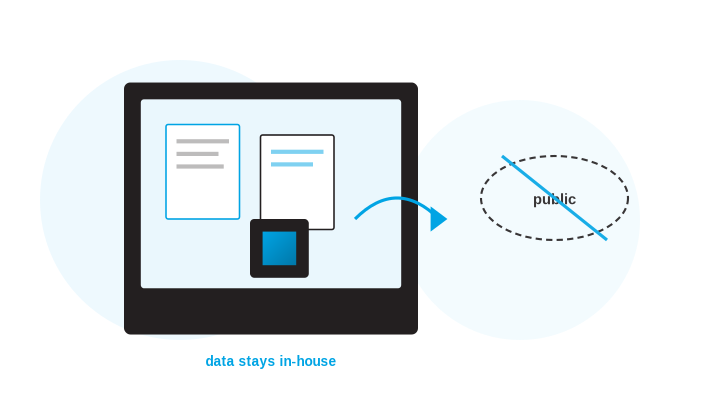
For businesses bound by professional confidentiality or with information that cannot leave the office, such as law firms, clinics, accountants or engineering firms, Werk installs and maintains an AI system running on hardware inside the company. Documents don’t go to the cloud, and the model answers from the company’s own documents.

We use NVIDIA DGX Spark, a compact desktop computer with the NVIDIA GB10 Grace Blackwell Superchip and up to 128 GB of unified memory, designed by NVIDIA to run large models locally. Werk chooses the right model for the task and the language, installs it, connects it to your documents, configures access and backups, and keeps everything up to date.

An example: a law firm that wants to search its own templates, opinions and filings by asking questions in plain language, without any document leaving the firm’s network.

Technical layer

Open-weight models chosen per task and language, served locally; internal web interface with company sign-in (Entra ID); permissions inherited from source folders; usage logs; backups of configuration and indexes; planned model updates.
05

Search over your documents (RAG), explained simply

A language model can write, but it doesn’t know your documents. The technique called RAG (retrieval-augmented generation) fixes that in two steps. First, the system searches your documents for the passages that answer the question, like a good search engine. Then it hands those passages to the model and asks it to answer only from them, showing where each part came from.

The result is answers based on your own documents, with the source next to them to check, without training the model on your data and without sending it out. When a document changes, the index updates. When someone has no access to a folder, the assistant won’t show them what is in it either.

Technical layer

Embedding-based indexing in a local vector database, section-aware document chunking, hybrid search (semantic and keyword), mandatory citations, permission filtering at query time.

06

Everyday IT is still the foundation

Accounts, network, backups and IT support are still needed. Well-managed accounts, correct permissions and organised data are what make the difference between a useful assistant and a risk.

For decision-makers

You don’t need to know how to pick models. You need to know three things: where AI saves time in your company, which data must never leave, and what it costs to do it properly. Werk answers that in writing, before anything is bought.

For the IT manager

Discovery of AI usage (shadow AI), data classification, DLP, business accounts with controlled retention and, for confidential data, local inference with RAG, group-based access control and auditable logs. No training data leaving the company.

What you get.

What you get, in writing.

  • Map of what the team already uses (including what nobody approved).
  • Short AI usage rules that are easy to follow.
  • Two or three priority uses, with a way to measure whether they work.
  • If you go for private AI: the system installed and documented, with access and backups.
  • Microsoft 365 settings so the rules are followed.

Frequently asked questions

Can we use ChatGPT or Copilot in the company?

Yes, with the right rules: business versions with a contract, properly configured, and rules that say which data may go in. The problem is rarely the tool, but using personal, free accounts with company data.

What is a local model?

An AI model that runs on a computer inside your company instead of on an internet service. Questions and documents stay on your network.

Are our documents used to train the model?

In a local system installed by Werk, no. The model does not learn from your documents: it reads the relevant passages at question time (RAG), and everything stays on the company’s hardware.

Is a local model as good as the big cloud services?

For general tasks, the largest cloud services are still ahead. For working with your own documents, with the source for each answer, a good open model running locally is usually enough, with the big advantage that the data never leaves. We test with your documents before recommending.

Do we really need an NVIDIA DGX Spark?

Not always. If the data isn’t confidential, an enterprise cloud tool may be the right and simpler choice. Local hardware makes sense when confidentiality is a professional, contractual or legal requirement.

Where do we start?

With a meeting and a survey: which tools are already in use, with which data, and where AI is worth it. Often the first result is a set of written rules and two settings in Microsoft 365, before anything is bought.

Know what your team should and shouldn’t do with AI.

The first meeting is free. Call or send us an email.

Contact · (+351) 211 570 970 · werk@werk.pt